 Canada

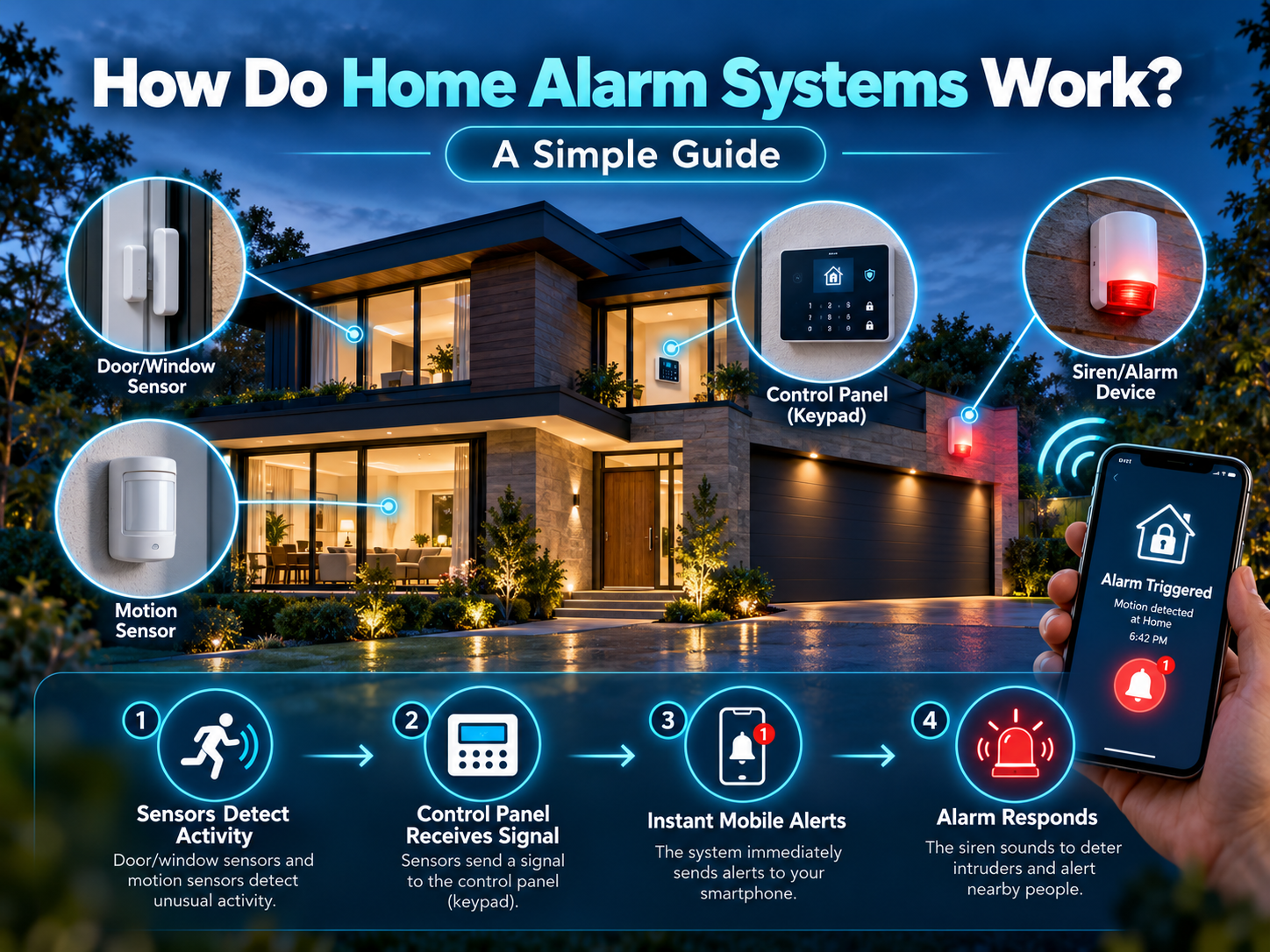
The exterior of a home alarm system seems like a complicated system with little white boxes on the doors, a keypad by the door and some stickers on the windows. The concept behind it is quite a simple one. A sensor detects something unusual, a control panel determines what it means and the system "talks" or "wails" or "both".
Each step is explained in simple terms and some steps, which are usually omitted in other guides, are included here, such as what happens in the event of a power outage, an internet failure, etc. as well as reasons for some alarms sounding immediately and others requiring 30 seconds to punch in a code.
The Short Version
All home alarm systems have four steps:
- Detect: a sensor detects a glass being broken, smoke, movement, etc., or a door opening.
- Decide: Control panel determines if the alarm is armed and what type sensor triggered the alarm.
- Respond: If it is a real trigger, the siren sounds and an alert is triggered.
- Report: Alert is sent to your phone, monitoring centre or both.
All other security equipment, including cameras, smart locks, and glass-break detectors, are based on this loop.
The Parts of a Home Alarm System
The Control Panel (the Brain)
The control panel represents the "heart" of the system. All sensors report to it, and it determines what is to be done. It also saves system settings (which sensors to turn on, which codes are permitted, who to notify, etc.). Panels typically are equipped with a backup battery and continue to operate during a power failure.
The panel performs so many functions, it's often installed hidden from view, in a closet or utility room, for example, where an intruder won't be first to see it.
The Controls are the Keypad or App.
This is how to activate and deactivate. The keypad will usually be located close to the main entrance and a second keypad may be installed near the bedrooms for night time use. Most modern systems also have mobile phone applications to control the system, so you can arm the system from the driveway or view the system when you're out.
Sensors (the Eyes and Ears)
Sensors are what actually detect a problem. The most common ones are:
| Sensor Type | What It Detects | Typical Location |
|---|---|---|
| Door and window contacts | A door or window opening | Exterior doors, ground-floor windows |
| Motion detectors | Movement inside a room | Hallways, living areas, basements |
| Glass-break sensors | The sound or vibration of breaking glass | Rooms with large windows or patio doors |
| Smoke and heat detectors | Smoke or a sharp rise in temperature | Hallways, bedrooms, kitchens |
| Carbon monoxide detectors | CO gas | Near sleeping areas and fuel-burning appliances |
| Water and flood sensors | Leaks or water on the floor | Basements, laundry rooms, under sinks |
There are only two components to a door contact: one on the door, and one on the frame. When the door is opened, the magnet moves away, the circuit is opened and the sensor turns on the signal to the panel. All other types of motion detectors will be able to sense the heat and movement of a room, and some of these will even be told to ignore pets that are smaller than a certain size.
Sirens and Strobes (the Local Response)
The system activates with a loud alarm and some activate with a strobe light as well. This can do two things: it can make an intruder jump, and it can let you know and your neighbours know there is something wrong.
The Optional Extras are Cameras and Doorbells.
Some alarm systems are not equipped with cameras, but most will support cameras. For a connected setup, an alarm can cause a recording to start, or you can view live video and determine what is happening, and send a response to the monitoring operator.
Armed vs. Disarmed: Why Modes Matter
An alarm only reacts to intrusion sensors when it's armed. Most systems offer a few modes:
- Away mode: everything is active, including interior motion detectors. Use this when the house is empty.
- Stay mode: Door window sensors are on but no motion sensors are on in the home, allowing you to roam about without restriction.
- Night mode: works like stay mode but with additional detectors on the lower level while you're sleeping in the upper level.
- Disarmed: intrusion sensors are suppressed, but smoke, CO, and flood sensors will keep sounding until they are disarmed.
Entry and Exit Delays
If an alarm went off the instant you opened the front door, you'd set it off every time you got home. That's why most systems include an entry delay, typically a short window to enter your code, and an exit delay, which gives you time to leave after arming. Some sensors, like those on a basement window, are usually set with no delay at all, since nobody should be coming in that way.
What Happens When an Alarm Triggers?
Here's the sequence in a typical monitored system:
- A change (such as an open door) is sensed while the system is armed.
- Sends a signal to the control panel.
- For a door with an entry delay, panel begins to count down. If an invalid code is entered it proceeds to the next step.
- The siren sounds.
- The panel sends an alarm signal to the monitoring centre and (usually) an alert to your phone.
- An operator calls you, and if cameras are connected, may ask to see video; might use a safe word to verify it's an emergency.
- Should it be established that it is true or they can't reach you, the operator sends medical, fire or police assistance.
If you have a self monitoring system, steps 5-7 are substituted with a beep on your phone, and then you make a decision about what to do.
How Does the Alarm Signal Actually Travel?
An alarm which cannot communicate is simply a loud noise. Either one or more of these routes are used by systems:
- Wi-Fi/broadband: quick and prevalent, but if you don't have a strong internet connection and electricity, it's not very reliable.
- Cellular: works like a small mobile phone built into the panel, so signals still go through if your internet is down.
- Landline: older systems make use of a phone line, which is now decreasing in popularity.
The most reliable are the cellular ones, either as primary mode or as an emergency means. It's important in a country such as Canada where winter storms can cause power or internet outages at the most inopportune times.
What is the role of the School Emergency Response Team in an Electricity Outage?
Most control panels are powered by a rechargeable backup battery that will keep the control panel operating for hours in case of a power failure. Wireless sensors are equipped with their own batteries. If any battery is low, the panel will beep and display a low battery message. The lesson learned: test backup batteries periodically and change sensor batteries in time for winter, as it's believed that they drain more quickly in cold weather.
Wired vs. Wireless Alarm Systems
- Wired systems are the cables which connect sensors to the panel. As they are not battery operated, they are reliable, but are easiest to install during construction or improvements to a home.
- Wireless systems are radio waves; the installation process is faster and simpler than running cable through walls. They require power from batteries and a strong signal so very large or dense-walled houses may require a signal repeater.
- Hybrid systems both wired and wireless are employed, but the cable is used where practical.
Still on the fence about how to install it yourself? Check out our article on DIY vs. professional home security installation to determine which type of home is best for DIY and which is best for professional installation.
Monitored vs. Self-Monitored: The Big Difference
| Factor | Professionally Monitored | Self-Monitored |
|---|---|---|
| Who gets the alarm | A monitoring centre, staffed around the clock | You, via a phone notification |
| Who decides to call for help | The operator, after trying to reach you | You |
| After-hours coverage | Yes | Only if you see the alert |
| Cost | Monthly monitoring fee | Usually lower or free |
A monitored system operates, even when you're not there and at different time zones. Self-monitored systems can only be effective if you know to look for the alert warnings.
Why False Alarms Happen (and How to Avoid Them)
Most false alarms come from everyday mistakes, not faulty equipment:
- Entering the wrong code, or forgetting the system is armed
- A pet triggering a motion detector that wasn't set for pets
- A loose window or door that rattles in the wind
- Low batteries in a sensor
- Moving balloons, curtains or heat vents in front of a detector.
Many cities have rules and fees for multiple false alarms, so check with your city. The easiest safeguards are to train everyone in the house how to arm and disarm the system and to maintain the batteries of the sensors.
Is an Alarm System Disabled?
Power or phone lines are sometimes cut by intruders. This is the basis of modern systems: backup batteries power the panel, cellular communication doesn't require a cable, and many panels give an alarm if a sensor or the main unit is tampered with. Another reason why cellular backup and a hidden control panel is important.
A Few Tips to Get the Most From Your Alarm System
- Arm it every time you leave and every night, as a habit rather than an exception
- Test it every few months, including the siren and the communication to the monitoring centre
- Keep your code private and change it when someone no longer needs it
- Pair it with a basic walk-through of your property so every door and ground-floor window is covered; our smart home security checklist is a good place to start
- Review common home security mistakes so small oversights don't undo a good system
Final Verdict
A home alarm system is a very simple process: the sensors get triggered, the control panel sends a signal to the siren, which sends a signal to the alarm monitoring centre and/or home. When it performs well, the things that don't get thought of are the parts that do the work well: reliable communication, back up power, proper arming procedures and the presence of a human being when the alarm is set off.
At United Security, we custom plan, install and monitor your home alarm system in the GTA, based on how your home is designed and how your family really lives, not what fits in a package. We are here to help you achieve a system that is clearly explained and set up.
Want an alarm system planned around your home? Contact us at 1-800-466-3348 to speak with a security specialist today from United Security and get a free, no-obligation consultation.