 Canada

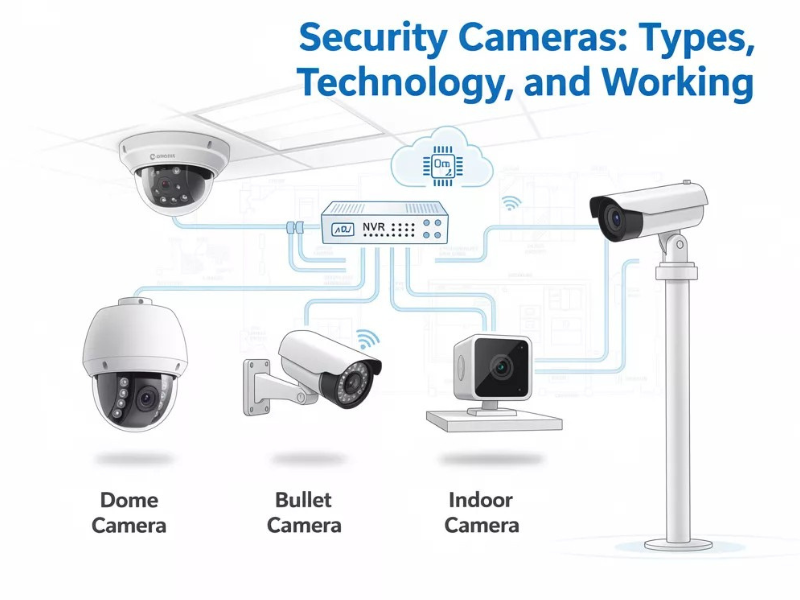
The landscape of home and business security has fundamentally shifted in 2026. Security cameras are no longer passive devices that simply record footage for later review; they have become Intelligent Guardians. Modern surveillance ecosystems now leverage edge computing, advanced AI analytics, and universal smart home protocols to prevent incidents before they even occur.
If you are looking to upgrade your property's defense, understanding the core types and the latest technological standards is the first step toward a future-proof installation.
1. Camera Types: Choosing the Right Form Factor
The physical design of a camera determines its field of view, durability, and how it is perceived by those on your property. Selecting the right "body" is critical for meeting specific security goals.
| Camera Type | Primary Use Case | Key Advantage |
|---|---|---|
| Bullet Cameras | Long-range perimeters & driveways | High visibility acts as a strong visual deterrent. |
| Dome Cameras | Indoor hallways & low entryways | Vandal-resistant design; difficult to redirect or damage. |
| Turret (Eyeball) | General outdoor & nighttime use | Best image quality; zero IR reflection from glass housings. |
| PTZ (Pan-Tilt-Zoom) | Large properties & warehouses | Motorized lens can track targets across 360 degrees. |
| Video Doorbells | Residential front doors | Combines two-way talk with person/package detection. |
The Professional Standard: DORI
When choosing a type, professionals use the DORI standard to determine placement:
- Detection: See that a person is there.
- Observation: See what they are doing.
- Recognition: Determine if you know them.
- Identification: Capture enough detail for legal evidence (facial features/tattoos).
2. 2026 Technology: What Makes a Camera "Smart"?
In 2026, the value of a camera is found in its "Brain" (the processor) rather than just its "Eye" (the lens).
AI-Powered Edge Computing
Modern cameras process data locally rather than sending everything to the cloud. This Edge Computing allows the camera to distinguish between a swaying tree and a human intruder in milliseconds. 2026 models feature Behavioral Analytics, which can alert you if someone is "loitering" (standing in one spot for too long) versus just walking by.
4K & 8K Forensic Detail
While 1080p was the standard for years, 4K (8-Megapixel) is now the baseline for 2026. This high resolution allows for Digital Zoom — the ability to zoom in on a recorded clip to read a license plate or a shipping label without the image becoming a pixelated mess.
Color Night Vision (Starlight Sensors)
Older cameras relied on Infrared (IR) which produced grainy black-and-white images. 2026 technology utilizes Starlight Sensors and wide-aperture lenses to pull in tiny amounts of ambient light, producing full-color video even in near-total darkness.
3. Connectivity: How Your Cameras Communicate
PoE (Power over Ethernet)
For maximum reliability, PoE remains the professional choice. A single Cat6 cable provides both 10Gbps data speeds and power to the camera. It is immune to Wi-Fi jamming and ensures your system stays online even if your wireless network is congested.
Matter & Thread Integration
2026 marks the full adoption of the Matter 1.5 protocol. This means your security cameras can now "talk" to your smart lights, locks, and thermostats regardless of the brand. If your camera detects a person at 3 AM, it can automatically turn on your outdoor floodlights and lock all smart deadbolts instantly.
4. Storage: Ownership vs. Convenience
How you store your footage impacts both your privacy and your monthly budget.
- Local NVR (Network Video Recorder): Footage is saved to a hard drive in your home. This is the most private method and carries zero monthly fees.
- Cloud Storage: Footage is encrypted and sent to a secure server. This is convenient for remote access but often requires a monthly subscription per camera.
- Hybrid Storage: Many 2026 systems record locally for speed and use the cloud only for "Important Events," giving you the best of both worlds.
5. The Importance of Professional Engineering
While DIY kits are widely available, a professionally engineered system addresses the specific challenges of the Canadian environment. From ensuring your cameras can survive a -40°C polar vortex to managing Privacy Masking (digitally blocking out your neighbor's windows to comply with privacy laws), professional installers ensure your system is a legal and technical asset.
At United Security Systems, we believe that premium protection shouldn't be out of reach. We specialize in designing custom 4K surveillance ecosystems that balance advanced AI technology with real-world affordability. Whether you are looking for a standalone camera or a fully integrated smart home solution, our packages start as low as $39.95/mo, backed by the industry-leading 24/7 monitoring of SecurTek.
Ready to secure your peace of mind? Contact United Security Systems today for a professional Ontario security audit.
Ready to secure your property? Contact 1-800-466-3348 to speak with a security specialist today and get a custom quote for your CCTV installation.